Buying a Refurbished Gaming Laptop: What Actually Matters About GPU and Cooling
 14 min read
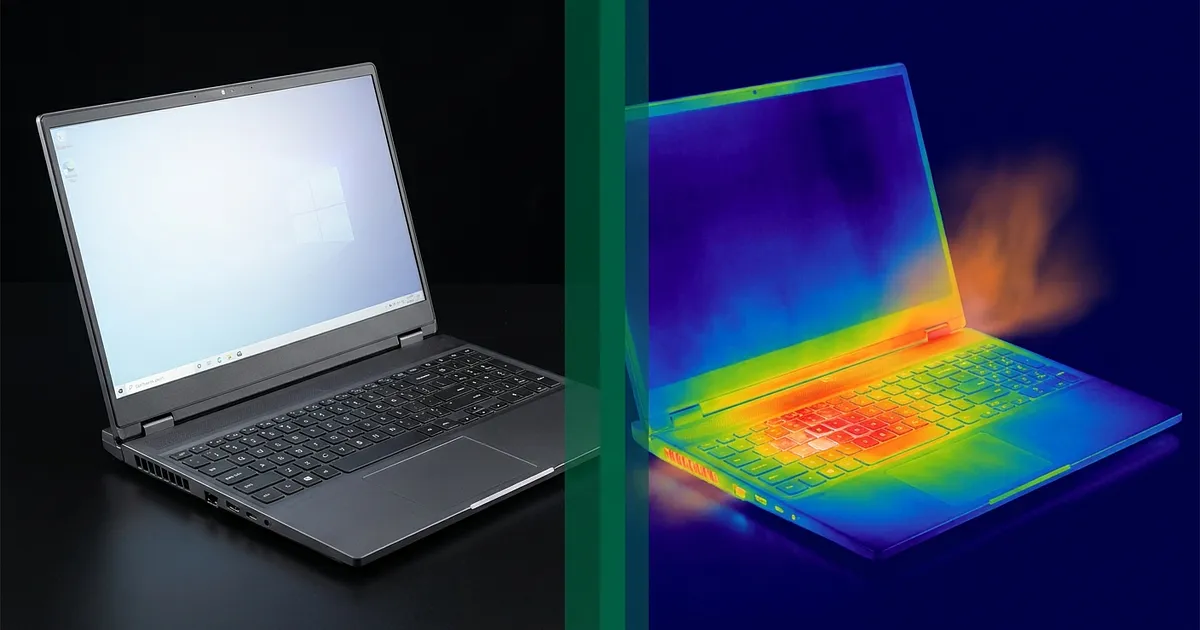
Two notebooks, the same RTX 4060, about 300 euros apart in price. And the expensive one pushes fewer frames. That sounds like a typo in the spec sheet. It isn't, because the laptop graphics card only tells you half the story at best.
Anyone shopping for a refurbished gaming laptop looks at the GPU first anyway. Fair enough, that's the number in the listing title. But on a second-hand machine the cooling system decides just as hard how much of that advertised performance actually reaches your screen. The thing has already had a life. Heat cycles, dust, thermal paste that dried out somewhere along the way.
That split is missing from almost every buying guide out there. Good GPU comparisons exist. Generic used-laptop checklists exist. Both together, aimed at gaming hardware? Barely. General buying criteria for a used notebook (CPU, RAM, display, battery life) live in our refurbished laptop buying guide. This piece sticks to the gaming-specific pair, GPU and cooling.
What "refurbished" actually covers on a gaming laptop
Refurbished means a seller took the device back, tested it, cleaned it, replaced faulty parts and put it back on sale with its own condition rating. Per refurbed's own quality page, devices go through up to 40 inspection steps, ship with at least 12 months of warranty and carry a 30-day return window.
That is a lot more than you get buying privately off a classifieds site. It just describes a different kind of condition than most buyers assume.
A grade like "Like new" or "Very good" rates cosmetics and function at the moment of sale. No scratches on the screen, every port works, the machine boots, the fans spin. What that inspection does not tell you is whether the cooling system survives half an hour of full load in an actual game without giving up clock speed. A function test isn't a sustained-load test. We break down what each grade means and where the sellers differ in our guide to refurbished condition grades.
For an office laptop none of this matters much. A work machine idles around 30 percent load and never really gets hot. A gaming laptop runs its cooling system to the limit every single session. So cooling is its own risk category here, not a footnote.
GPU generations on a refurbished gaming laptop: what your money buys
On the refurbished market you'll mostly run into three tiers, and they sit a long way apart on price. Current 50-series cards barely show up second-hand yet, the market is simply too young for that.
| GPU (Laptop) | Year | CUDA cores | VRAM | Power budget | Realistically good for |
|---|---|---|---|---|---|
| GTX 1660 Ti | 2019 | 1,536 | 6 GB GDDR6 | up to 80 W | 1080p, medium settings, older titles. No ray tracing, no DLSS |
| RTX 3060 | 2021 | 3,840 | 6 GB GDDR6 | 60 to 115 W | 1080p on high, 1440p with compromises, DLSS 2 |
| RTX 4060 | 2023 | 3,072 | 8 GB GDDR6 | 35 to 115 W plus Dynamic Boost | 1080p high to max, 1440p, DLSS 3 with Frame Generation |
The core count is misleading, by the way. The RTX 4060 has fewer CUDA cores than the RTX 3060 and still wins comfortably, because the architecture moved on a generation. According to Notebookcheck the gap reaches 65 percent in Forza Horizon 5 at 1440p and 36 percent in Shadow of the Tomb Raider at 1080p. Averaged across more games it usually lands closer to 20 or 40 percent.
Against the GTX 1660 Ti the gap turns brutal. A 14-benchmark comparison from technical.city puts the RTX 4060 ahead by 55 percent on average, with a 229 percent better value-for-money score.
VRAM is where the older cards start to fall over
Six gigabytes was generous in 2019 and still fine in 2021. Today it's the wall you hit when you have to drop texture quality in a new title even though the raw horsepower would have coped.
Tom's Guide now argues for 16 GB of VRAM as the safe target against modern AAA demands, pointing at sales figures where 16 GB SKUs comfortably outsell their 8 GB siblings. On a laptop at this price point 16 GB is fantasy. But the direction holds: 8 GB ages more slowly than 6 GB, and you'll feel that when you resell in two years.
So is the GTX 1660 Ti junk? Not really. For League of Legends, CS2, indie titles and basically anything before 2021 it still does the job, and it's the only card here you can genuinely get cheap. It's a budget purchase though, not an investment.
TGP: why two identical RTX 4060 machines run at different speeds
This is where most listings stop being informative. The same RTX 4060 laptop GPU is allowed to draw anywhere from 35 to 115 watts depending on the chassis. The laptop maker decides that, not NVIDIA. Between the weakest and strongest configuration you can see over 30 percent performance difference, with the same model name printed on the box.
A slim 15-inch ultrabook with an RTX 4060 is not the same machine as a 2.6 kilo brick with the same card. And the listing won't tell you which one you're looking at. What helps is searching the exact model number before you buy and checking a database like Notebookcheck for the power budget that specific machine shipped with.
Why cooling matters more than the GPU on a refurbished gaming laptop
Now the underrated part.
Thermal paste is a wear item. It sits between chip and heatsink, and it dries out. According to the thermal paste guide from Computer Compatibility, it ages faster in gaming laptops than in ordinary notebooks, because those machines cycle constantly between roughly 40 degrees at idle and 85 degrees or more under load. The guidance there: repaste every three to five years, or every two to three under sustained gaming load.
Which means a refurbished gaming laptop from 2021 or 2022 sits right inside that window, or past it. Whether the refurbisher replaced the paste appears on no condition grade anywhere.
Does it even make a difference? In that same guide, load temperature after a repaste drops from 83 to 79 degrees. Four degrees sounds like nothing. In a thermally tight chassis it's exactly the buffer between throttling and full clocks.
Then there's dust. It packs into the heatsink fins, not the fans themselves, and chokes the airflow there. From the outside the machine looks spotless. Under load it behaves like a different device.
The case that shows why a newer GPU doesn't save you
A user report aggregated by Notebookcheck describes a Lenovo Legion 7 with a Ryzen 7 5800H and RTX 3070 that started overheating and throttling within 18 months. A full repaste and internal clean didn't fix it. The owner wrote that he'd simply given up on doing heavy work on the machine.
A comment in the same thread nails it: it isn't the brand, it's the build quality and thermal design that matter most.
That sentence is really what this whole article is about. Cooling quality is a property of the chassis, not the GPU generation. A well-cooled RTX 3060 machine beats a badly-cooled RTX 4060 machine under sustained load, reliably. If you assume the newer card automatically means the cooler laptop, you're spending money in the wrong place.
Cooling pads only go so far, honestly. One drops the temperature of the bottom shell, but it fixes neither clogged fins nor dried-out paste. As a supplement to a healthy cooling system, sure. As a rescue for a sick one, no.
A checklist for your refurbished gaming laptop's return window
Refurbed lists a 30-day return window, Back Market the same. That's your inspection period, and it's genuinely surprising how few buyers use it. Unbox, power on, tick "it works", done. That tests approximately none of the things that go wrong on a gaming laptop.
What's worth doing in that time:
- Monitoring software first. HWiNFO or MSI Afterburner installed before anything else happens. Without temperature and clock readings you're just guessing.
- Thirty minutes of real load. Not a ten-second benchmark. A demanding game or a stress-test tool, half an hour straight, so the chassis genuinely heats through. The first five minutes tell you nothing, every cooling system survives five minutes.
- Watch the GPU clock, not just the temperature. What matters is whether clocks drop noticeably below the starting figure after 15 to 20 minutes and stay there. Temperatures around 85 degrees are normal on gaming laptops. A clock that collapses by 30 percent and never recovers is not.
- Compare framerate at the start and at the end. Same scene, same settings, minute 2 against minute 28. A small drop is expected. A quarter of your frames gone is not.
- Note what the fan does. Gets loud, then settles down again? Fine. Pinned at maximum from minute three onward? Less fine.
- Ports and battery while you're at it. Every USB port, HDMI, headphone jack, webcam, keyboard backlight. How to check battery health has its own guide, for the return window a quick look at charge cycles and capacity is enough. Community reports suggest port defects are the single most common complaint on used machines.
Honestly, point 3 is the one that carries the weight. The rest is diligence. But point 3 only works if you did point 1 first.
Warning signs I'd send it back for
A loud laptop fan on its own is not a defect. Gaming laptops are loud, that's physics rather than a fault. A refurbished deal documented by Notebookcheck for an MSI Titan GT77 with an RTX 3080 Ti and two years of warranty came with an explicit note that the machine gets very loud under full load. That was a property of the model, not a condition problem.
Other patterns are where it gets serious:
The fan is audible at idle with nothing running in the background.
GPU clocks fall off sharply inside the first fifteen minutes and never come back.
Temperature jumps past 95 degrees within seconds of load starting.
Barely any air comes out of the vents even though you can clearly hear the fans spinning. Classic sign of clogged fins.
A rattling or grinding noise from the fan area. Those are the bearings, and they don't get better.
That last one isn't up for debate. Most of the others can often be fixed with a clean and fresh paste. But why pay for that when you could just swap the machine inside the window?
Refurbed, Back Market and Rebuy compared
All three sell gaming laptops, all three offer at least 12 months of warranty, all three run their own condition grades. The differences that matter specifically for gaming hardware are narrower than the marketing suggests. A full platform comparison across every device category, not just gaming laptops, lives separately.
What tips it in practice is the length of the return window, because that window is your inspection period. And whether thermal throttling is even accepted as a defect when the machine otherwise works fine. That gets uncomfortably concrete, because "slower than I expected" isn't a fault in any technical sense. Returning inside the window is the cleaner route than arguing warranty afterwards.
Full warranty periods for all three sellers, including the difference between statutory rights and a seller's voluntary warranty, live in our refurbished warranty guide. That comparison belongs there rather than in a GPU article.
One more note on price comparison. The same model shows up at several sellers in different condition grades at different prices. On gaming laptops the gap between "Very good" and "Good" often runs 60 to 100 euros, and the difference is purely cosmetic. On a machine that lives under a desk anyway, that's the easiest saving available.
Cooling beats GPU generation
If one thing survives from this article: the graphics card in the listing title tells you what the machine could do when it was new. What it can still do today is something only a stress test in your own living room will tell you.
Shortlist by GPU, sure. Decide after 30 minutes under load. And use the return window instead of letting it lapse, because it's the only part of this purchase where you hold any real control. A refurbished gaming laptop is worth it almost every time, provided you use those 30 days to actually check.
For price comparison across Refurbed, Back Market and Rebuy you'll find current offers on Refurbito. Which machine ends up in your basket, though, is a decision the fan makes.
Frequently Asked Questions
What does refurbished mean for a gaming laptop?
A seller took the refurbished gaming laptop back, tested it, cleaned it, replaced faulty parts and put it back on sale with its own condition grade. That's more scrutiny than a private sale, but it only covers cosmetics and function at the moment of sale, not whether the cooling survives half an hour of full load.
Is a refurbished gaming laptop actually worth it?
Yes, provided you're willing to test the machine properly inside the return window. The saving against new is substantial depending on generation, and the silicon itself rarely fails. The risk almost always sits in the cooling system, and that's exactly what you can check yourself within 30 days. Unbox it and hope, though, and you've bought a lottery ticket.
Which GPU generation is still worth buying used?
The RTX 4060 is the current sweet spot: 8 GB of VRAM, DLSS 3, and clearly more performance than the RTX 3060. The RTX 3060 still makes sense when the price gap is wide enough and you play at 1080p. The GTX 1660 Ti works only as a budget option for older and esports titles now, since it lacks ray tracing and DLSS entirely.
How do I tell whether a used laptop overheats or throttles?
Run monitoring software like HWiNFO and put at least 30 minutes of real load through it. What matters is the GPU clock rather than the absolute temperature. If clocks drop well below the starting figure after 15 to 20 minutes and stay there, the machine throttles permanently. Readings around 85 degrees, by contrast, are completely normal and no reason to return anything.
Do I need to replace the thermal paste on a refurbished gaming laptop?
Not automatically, but budget for it. On machines older than roughly three years, factory paste is at the end of its documented service life. No condition grade tells you whether the refurbisher replaced it, so ask if you're unsure. A repaste buys a few degrees in a tight chassis, and those degrees can decide whether it throttles.
Does a newer GPU mean better cooling?
No, and that's the most expensive assumption in this whole purchase. Cooling capacity comes from chassis design, power budget and thickness, not the GPU generation. A well-cooled RTX 3060 laptop holds more performance under sustained load than a slim RTX 4060 machine. So check the specific model, never just the name of the graphics card.
Sources
- refurbed's own quality page refurbed.de
- Notebookcheck notebookcheck.net
- 14-benchmark comparison from technical.city technical.city
- Tom's Guide tomsguide.com
- thermal paste guide from Computer Compatibility computercompatibility.com
- aggregated by Notebookcheck notebookcheck.net
- refurbished deal documented by Notebookcheck notebookcheck.net